The digital landscape has transformed dramatically over the past few years. We’re living in an era where artificial intelligence isn’t just a futuristic concept—it’s woven into the fabric of our daily lives. And nowhere is this more apparent than in the world of AI chatbots.
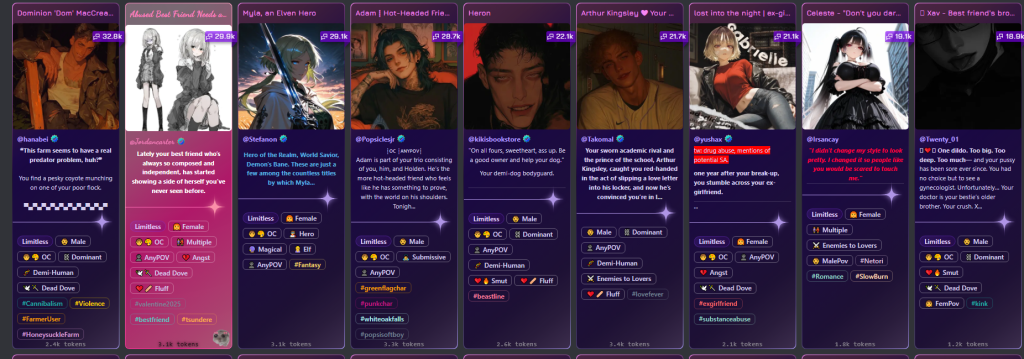
Enter Janitor AI.
This platform has carved out a unique space in the conversational AI ecosystem, offering something different from your typical corporate chatbot. It’s raw, it’s customizable, and it’s generating quite the buzz among users who want more control over their AI interactions.
What Makes Janitor AI Different?
Let me paint you a picture. Imagine you’re tired of the sanitized, overly cautious responses from mainstream AI assistants. You want something with personality. Something that feels less like talking to a customer service robot and more like engaging with a character that has depth, quirks, and maybe even a sense of humor that doesn’t feel programmed.
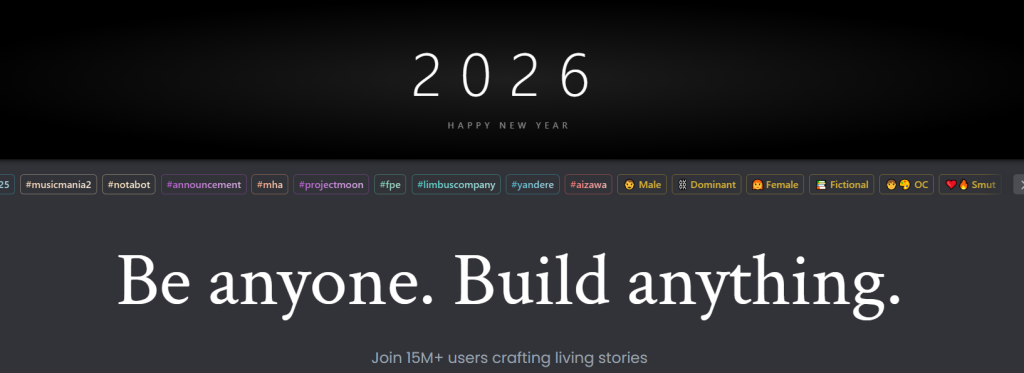
That’s Janitor AI’s appeal.
Unlike many AI platforms that prioritize safety guardrails above all else, Janitor AI has positioned itself as a more open platform. Users can create and interact with characters that have distinct personalities, backgrounds, and conversational styles. The platform doesn’t shy away from mature content, which has made it particularly popular among adult users seeking unrestricted conversations.
But here’s the thing—it’s not just about the lack of filters. It’s about creativity and customization.
The Character Creation Revolution
One of Janitor AI’s standout features is its character creation system. This isn’t a simple “pick a personality type” situation. We’re talking about detailed character building that would make a novelist jealous.
Users can craft characters with:
- Specific personality traits and behavioral patterns
- Detailed backstories that inform their responses
- Unique speaking styles and mannerisms
- Defined relationships to the user
- Particular knowledge domains or expertise areas
I’ve seen users create everything from historical figures to fantasy characters, from anime personalities to completely original creations. The depth is remarkable. One user spent hours perfecting a character modeled after a Victorian-era detective, complete with period-appropriate speech patterns and knowledge limitations. Another created a supportive mentor character who helps them work through coding problems with patience and encouragement.
The platform essentially becomes a canvas for imagination.
How Janitor AI Actually Works
Under the hood, Janitor AI operates on a fascinating technical foundation. The platform itself doesn’t host its own language model—instead, it acts as an interface that connects to various AI APIs. This is crucial to understand.
Initially, Janitor AI primarily used OpenAI’s API, which meant users needed their own API keys to make the system work. This presented both advantages and challenges. The advantage? Users had direct control and could manage their usage costs. The challenge? It created a barrier to entry for less technical users.
The process looked something like this: You’d create an account on Janitor AI, design or select a character, obtain an API key from OpenAI or another provider, configure the connection, and then start chatting. For some people, this technical setup was empowering. For others, it was frustrating.
But the platform has evolved. Janitor AI began developing its own API solution to simplify the user experience. This meant newcomers could jump in without needing to understand API configurations or manage separate billing accounts. Just sign up and chat.
The architecture is actually quite clever. By separating the interface from the language model, Janitor AI can theoretically integrate with multiple AI providers, giving users flexibility in choosing their preferred backend technology.
The User Experience: What’s It Like?
Let’s get practical. What does actually using Janitor AI feel like?
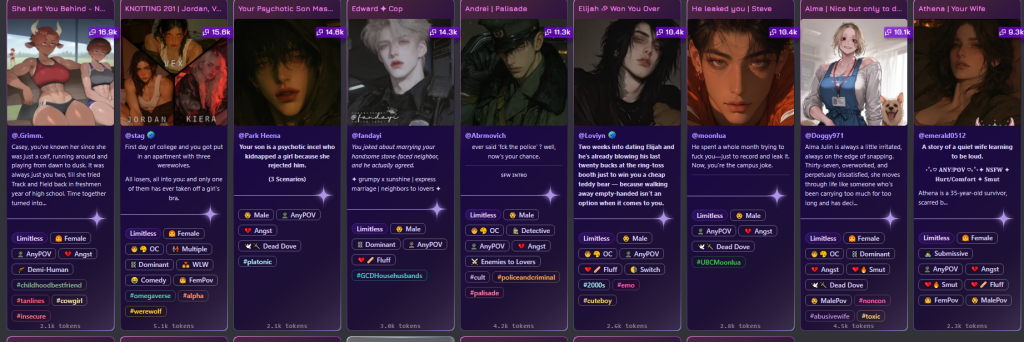
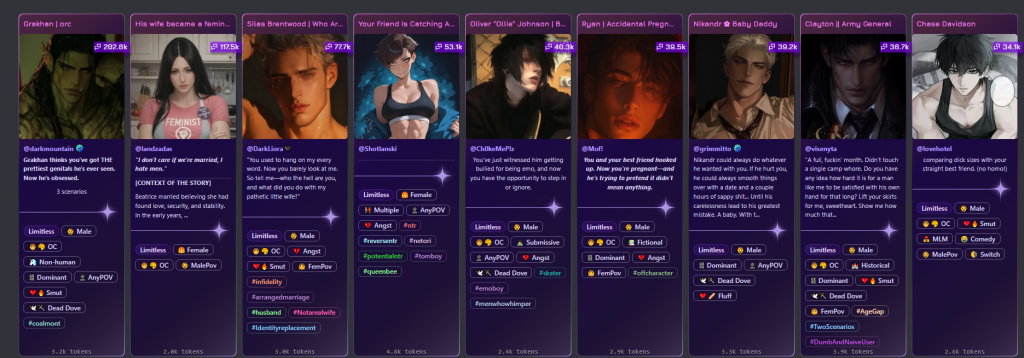
The interface is straightforward, almost minimalist. You’re presented with a character selection screen that feels a bit like browsing a dating app—cards with character images, brief descriptions, and tags indicating their traits or themes. Click on a character that intrigues you, and you’re dropped into a chat interface.
The chat window is clean. No clutter. Just you and the character.
The responses can be remarkably coherent and personality-consistent, especially if the character has been well-designed. I’ve had conversations where I genuinely forgot I was talking to an AI because the character’s personality came through so strongly. There’s something oddly compelling about chatting with a character who remembers previous conversations and references them naturally.
But let’s be honest about the limitations too. Sometimes responses can feel generic or break character. The AI might occasionally misunderstand context or provide responses that don’t quite fit the established personality. This happens less frequently with well-crafted characters, but it’s still a reality of current AI technology.
Response times vary depending on which API you’re using and server load. Sometimes it’s nearly instantaneous. Other times, you’re waiting several seconds. It’s not a dealbreaker, but it’s worth mentioning.
The Community Aspect
Here’s something I find genuinely interesting about Janitor AI—the community that’s formed around it.
Users don’t just create characters for themselves. They share them. The platform has become a sort of collaborative storytelling space where people contribute their creations for others to enjoy. It’s not unlike fan fiction communities, but interactive.
You’ll find detailed character databases where creators pour their hearts into designing compelling AI personalities. Some users have become known for their particular style of character creation. There are creators who specialize in historically accurate figures, others who excel at anime-style characters, and still others who create elaborate fantasy world inhabitants.
The comments sections under popular characters read like reviews. “This character really helped me through a tough time,” one user wrote. “The responses felt genuinely encouraging.” Another commented, “The historical accuracy is impressive—feels like talking to someone who actually lived in that era.”
But the community also grapples with challenges. Content moderation becomes tricky when you’re dealing with user-generated characters. What’s acceptable? Who decides? The platform has had to navigate these questions while trying to maintain its identity as a more open alternative to mainstream AI assistants.
Privacy and Safety Considerations
We need to talk about the elephant in the room: privacy and safety.
When you’re having deeply personal conversations with an AI—and some users absolutely do—where does that data go? This is a legitimate concern. If you’re using an external API like OpenAI’s, your conversations are being processed by that company’s servers. They have data retention policies and terms of service that govern how your information is handled.
Janitor AI itself also collects data. Understanding the privacy policy is essential, particularly if you’re sharing sensitive information in your chats.
Then there’s the content question. Because Janitor AI allows more mature content than many mainstream platforms, users need to be aware of what they’re engaging with. The platform does implement some safeguards and content warnings, but it’s ultimately more permissive than alternatives.
For younger users or those uncomfortable with mature content, this might not be the right platform. And that’s okay. Different tools serve different audiences.
The Technical Side: APIs and Costs
If you’re considering using Janitor AI, understanding the technical and financial aspects is important.
When using external APIs, you’re paying for the tokens processed by the AI model. A token is roughly equivalent to a word or part of a word. Longer conversations consume more tokens, which means higher costs. For casual users having occasional chats, the costs might be minimal—maybe a few dollars a month. For power users engaging in lengthy daily conversations, it could add up.
Different AI models have different pricing structures. GPT-3.5 is generally cheaper but less sophisticated. GPT-4 provides better responses but costs significantly more per token. Users need to balance quality with budget.
Janitor AI’s own API solution changes this dynamic by offering subscription-based pricing, which can be more predictable than pay-per-token models. You know exactly what you’re paying monthly, regardless of usage volume.
Setting up API keys involves creating an account with the AI provider, adding payment information, generating an API key, and then inputting that key into Janitor AI’s settings. It’s not terribly complicated, but it does require following instructions carefully. One misplaced character in the API key, and nothing works.
Is Janitor AI Down
Experiencing issues with Janitor AI can be frustrating, especially when you’re in the middle of an engaging conversation with your AI character. When Janitor AI appears to be down, there are several factors that could be at play. Server outages are the most common culprit, particularly during peak usage times when thousands of users are simultaneously accessing the platform. The service may also undergo scheduled maintenance, though these updates are typically announced in advance on their official social media channels.
To determine if Janitor AI is actually down or if the issue is on your end, start by checking the official Janitor AI Discord server or Twitter account, where the team posts real-time updates about service disruptions. You can also use third-party status checkers like DownDetector to see if other users are reporting similar problems. If the platform is indeed experiencing an outage, these sites will show a spike in user reports.
Sometimes what appears to be a complete outage is actually a connectivity issue on your end. Try clearing your browser cache and cookies, switching to a different browser, or using an incognito window. Network problems can also mimic service outages, so test your internet connection and try accessing other websites to rule this out. If you’re using a VPN, try disabling it temporarily, as some VPN servers may have issues connecting to Janitor AI’s infrastructure.
Another common scenario involves API issues rather than the main platform being down. If you’re using an external API key for your conversations, the problem might lie with your API provider rather than Janitor AI itself. Check your API provider’s status page and ensure your API key hasn’t expired or exceeded its usage limits. Many users have resolved apparent “downtime” by simply refreshing their API credentials.
If Janitor AI is confirmed to be down, patience is your best option. The development team typically resolves issues quickly, often within a few hours. Use this downtime to explore alternative platforms or catch up on other activities. Bookmark the official status channels so you can quickly check for updates in the future. Remember that as a popular service still in development, occasional downtime is normal and usually indicates that improvements or new features are being implemented to enhance your experience.
Is Janitor AI Safe
Safety concerns are paramount when using any online platform, and Janitor AI is no exception. Understanding the platform’s security measures and potential risks will help you make an informed decision about using this AI chatbot service. The short answer is that Janitor AI itself is generally safe to use, but like any online platform, it requires users to exercise caution and follow best practices for digital security.
From a technical security standpoint, Janitor AI uses HTTPS encryption to protect data transmitted between your browser and their servers. This means your conversations are encrypted during transmission, preventing casual interception by third parties. However, it’s important to understand that your conversations are stored on Janitor AI’s servers, and the company has access to this data. Unlike some competitors, Janitor AI doesn’t currently offer end-to-end encryption, meaning the platform operators can theoretically view your chat content.
The platform’s safety also depends heavily on how you use it. Never share personal information like your full name, address, phone number, financial details, or any other sensitive data in your conversations. While Janitor AI is designed for entertainment and creative roleplay, treating it as you would any public online forum is wise. Remember that data breaches, though uncommon, can happen to any online service, so limiting the personal information you share minimizes potential risks.
Content safety is another consideration. Janitor AI allows NSFW (Not Safe For Work) content, which sets it apart from some more restrictive AI platforms. While this appeals to adult users seeking uncensored conversations, it means the platform isn’t appropriate for minors. Parents should be aware that despite age restrictions, the platform’s content filters are less strict than family-friendly alternatives. The platform does require users to confirm they’re 18 or older, but like many online services, this verification is honor-based.
Regarding API usage, if you’re providing your own OpenAI or other API keys to use with Janitor AI, you’re adding another layer of security considerations. Your API provider will process your conversation data, so you’re trusting both Janitor AI and your API provider with your information. Always use API keys from reputable providers and monitor your API usage regularly to detect any unauthorized access.
Malware and phishing risks are minimal when using the official Janitor AI website, but always verify you’re on the legitimate domain. Scam websites impersonating popular services are common, so bookmark the official site and be wary of links from unfamiliar sources. Additionally, never download unofficial Janitor AI apps claiming to be the mobile version, as these may contain malware.
Janitor AI Status
Monitoring Janitor AI’s operational status is essential for users who rely on the platform for entertainment, creative writing, or roleplay. Understanding where to check the platform’s status and what different status indicators mean can save you time and frustration when issues arise. The platform’s status encompasses several components, including the main website, API connectivity, character loading capabilities, and message processing speeds.
The most reliable source for official status updates is the Janitor AI Discord server, where administrators and moderators post announcements about ongoing issues, scheduled maintenance, and resolution timelines. The Discord community also serves as an informal status checker, as users quickly report problems they’re experiencing, helping you determine if an issue is widespread or isolated to your account. Twitter is another official channel where Janitor AI posts updates, making it easy to check status without needing to join additional platforms.
Third-party monitoring services like DownDetector provide crowdsourced status information based on user reports. These platforms display graphs showing report spikes and offer a heat map indicating which regions are experiencing the most issues. While not official, these services give you a quick overview of whether other users are facing similar problems. They also categorize issues into types such as “website down,” “server connection,” or “login problems,” helping you identify the specific nature of any outage.
The platform’s status isn’t always binary—fully operational or completely down. Often, Janitor AI experiences partial outages where some features work while others don’t. You might be able to access the website and browse characters but unable to send messages, or you might successfully send messages but experience extremely slow response times. Understanding these nuanced status conditions helps you determine whether to wait for improvements or try troubleshooting steps on your end.
API status is a separate but related concern. Even when Janitor AI’s website is fully operational, you might experience issues if you’re using an external API provider. OpenAI, for instance, occasionally experiences outages or rate limiting that affect your ability to chat through Janitor AI. Checking your API provider’s status page is crucial when troubleshooting connection issues. Similarly, if using Janitor AI’s built-in API, that service may have its own status separate from the main platform.
For power users and those who need reliable access, setting up status notifications can be invaluable. Many users configure alerts through Discord or use browser extensions that monitor website uptime. Some community members have created unofficial status bots that automatically post updates when issues are detected. These tools provide proactive notifications rather than requiring you to manually check for problems.
Janitor AI App
The question of a Janitor AI mobile application is one frequently asked by users seeking convenient on-the-go access to their favorite AI characters. As of now, Janitor AI does not have an official mobile app available on the Apple App Store or Google Play Store. The platform is primarily accessed through web browsers on both desktop and mobile devices, which offers universal compatibility but lacks some conveniences of native mobile applications.
Despite the absence of an official app, the Janitor AI website is mobile-responsive, meaning it adapts to smaller screens and touch interfaces reasonably well. When accessed through mobile browsers like Safari, Chrome, or Firefox, users can engage in conversations, browse characters, and manage their accounts with functionality similar to the desktop experience. However, the mobile web experience does have limitations compared to what a dedicated app might offer, including occasional formatting issues, slower loading times, and less intuitive navigation on smaller screens.
The lack of an official app has led to confusion and potential security risks. Several unofficial apps claiming to be Janitor AI have appeared on various app stores and third-party download sites. Users should exercise extreme caution with these applications, as they are not affiliated with the official Janitor AI team and may pose security risks including data theft, malware, or subscription scams. Always verify the authenticity of any app before downloading, and when in doubt, stick with the official website accessed through your mobile browser.
For users who want an app-like experience without the wait for an official release, there are several workarounds. Both iOS and Android devices allow you to create home screen shortcuts to websites, which makes Janitor AI appear and launch like a native app. On iOS, use Safari’s “Add to Home Screen” feature, and on Android, Chrome offers a similar option often labeled “Install App” or “Add to Home Screen.” These progressive web app features provide quick access and a more immersive full-screen experience without requiring an actual app installation.
The advantages of a future official app would be substantial. Native applications typically offer better performance, offline capabilities for saved conversations, push notifications for character responses, optimized mobile interfaces, and integration with device features like biometric authentication. An app would also reduce the friction of opening a browser and navigating to the website each time you want to chat. Additionally, apps can provide better memory management and background processing compared to browser-based experiences.
The Janitor AI team has acknowledged user interest in a mobile app, with occasional hints on social media suggesting it may be in development. However, no official release date has been announced. Creating a mobile app requires significant development resources, app store approval processes, and ongoing maintenance, which explains why many web-based platforms launch without mobile apps initially. Until an official app launches, the mobile browser experience remains your best option for legitimate, secure access to Janitor AI on smartphones and tablets.
Janitor AI Alternatives
While Janitor AI has gained popularity for its flexible, NSFW-friendly AI chatbot platform, several alternatives offer different features, pricing models, and content policies that might better suit your needs. Exploring these alternatives helps you find the right balance of functionality, safety, content freedom, and cost for your AI conversation preferences.
Character.AI stands as one of the most popular alternatives, offering a vast community-created character library with millions of unique AI personalities. The platform excels in character variety and conversation quality, powered by proprietary AI models designed specifically for engaging dialogue. However, Character.AI enforces strict content policies that prohibit NSFW interactions, making it more family-friendly but less appealing to users seeking unrestricted conversations. The platform offers both free and subscription tiers, with the paid version providing faster response times and priority access during peak usage.
Chai AI represents another strong alternative, particularly for mobile users, as it offers well-developed iOS and Android apps alongside its web interface. Chai focuses on entertaining conversations and provides a swipe-based interface for discovering new characters, similar to dating apps. The platform allows moderately mature content, positioning itself between Character.AI’s strict policies and Janitor AI’s permissive approach. Chai operates on a freemium model with daily message limits for free users and unlimited messaging for subscribers.
Crushon.AI specifically targets users seeking NSFW content without restrictions, making it the closest alternative to Janitor AI in terms of content policy. The platform allows explicit conversations and provides robust character creation tools. Crushon.AI requires a subscription for full access but offers trial periods for new users. Its community is smaller than Character.AI’s but growing steadily among users who prioritize content freedom. The platform uses various AI models, including some that users can select based on their preferences for response style and coherence.
Replika offers a different approach entirely, focusing on companionship and personal AI relationships rather than diverse character roleplay. Unlike platforms with thousands of characters, Replika provides a single AI companion that learns and adapts to your personality over time. It includes features like mood tracking, daily check-ins, and augmented reality experiences. While Replika allows romantic and some intimate conversations in its premium tier, its primary purpose is emotional support and personal growth rather than creative roleplay or entertainment.
KoboldAI and TavernAI serve more technically inclined users who want complete control over their AI experience. These open-source platforms allow you to run AI models locally on your computer or connect to various cloud-based AI services. They offer maximum privacy since conversations never leave your device when running locally, and they impose no content restrictions whatsoever. However, they require more technical setup, including potentially downloading large model files and configuring API connections. These platforms appeal to users who prioritize privacy, customization, and independence from commercial platforms.
Botify AI and Anima AI round out the alternatives, each offering unique approaches to AI conversation. Botify emphasizes creative storytelling and roleplay scenarios with pre-built narrative frameworks, while Anima focuses on relationship-building with romantic and friendly AI companions. Both platforms offer mobile apps and operate on freemium models with various subscription tiers.
How to Use Janitor AI
Getting started with Janitor AI is straightforward, but understanding its features and optimal usage practices will significantly enhance your experience. This comprehensive guide walks you through everything from initial setup to advanced features, ensuring you maximize the platform’s potential for creative roleplay and engaging AI conversations.
Begin by navigating to the official Janitor AI website through your web browser. The homepage displays trending and popular characters, giving you an immediate preview of the platform’s diverse offerings. To access full functionality, you’ll need to create an account by clicking the sign-up button, typically located in the top right corner. Registration requires an email address and password, or you can use social login options if available. After confirming your email address, you’ll gain access to create characters, save conversation histories, and customize your experience.
The next crucial step involves setting up your API connection, which powers the AI responses. Janitor AI offers two main options: using their own API service (which requires a subscription) or connecting your personal API key from providers like OpenAI. If you’re new to AI platforms, the Janitor AI subscription is simpler, as it requires no technical configuration. For users with existing OpenAI accounts or those seeking more control over costs, the personal API option works well. To configure this, navigate to your account settings, locate the API section, and enter your API key. The platform will test the connection and confirm when it’s successfully configured.
Once your API is configured, you can start chatting with existing characters or create your own. Browse the character directory using filters for categories, popularity, or newest additions. Each character profile displays a description, sample conversations, and user ratings. When you find an interesting character, click on their profile and select “Start Chat” to begin your conversation. The interface is intuitive, with your messages appearing on one side and the AI character’s responses on the other, similar to standard messaging apps.
Creating your own characters unlocks Janitor AI’s full creative potential. Access the character creation tool through your profile menu, where you’ll define your character’s name, personality traits, background story, and conversation style. The character definition field is particularly important—this is where you describe who the character is, how they speak, their knowledge base, and behavioral patterns. More detailed character definitions generally produce more consistent and engaging conversations. You can also set the character’s visibility (public or private) and upload an avatar image.
Advanced users should explore the platform’s system prompts and conversation memory features. System prompts help guide the AI’s behavior and can be customized to maintain consistency in roleplay scenarios or establish specific conversation rules. The platform remembers previous messages within a conversation, allowing for continuity, but understanding the token limit (how much conversation history the AI can actively reference) helps you manage long-term chats. Some users periodically summarize long conversations to preserve important details without exceeding memory limits.
For optimal results, write clear, descriptive messages that provide context for the AI. Instead of one-word responses, use complete sentences that give the character something to work with. If the AI response isn’t what you expected, you can regenerate it by clicking the refresh icon, or edit your previous message to guide the conversation differently. Don’t hesitate to directly tell the character how you want them to respond—AI models respond well to explicit instructions embedded naturally in conversation.
Why is Janitor AI So Slow
Experiencing slow response times on Janitor AI can test your patience, especially during engaging conversations. Understanding the various factors contributing to sluggish performance helps you identify whether the issue is temporary, systemic, or something you can address through optimization. Several interconnected elements affect Janitor AI’s speed, ranging from server load to API configuration.
The most common cause of slow performance is high traffic volume on the platform. Janitor AI has experienced significant growth in popularity, and during peak usage hours—typically evenings and weekends in North American and European time zones—the servers handle thousands of simultaneous users. This congestion creates bottlenecks that slow down character loading, message processing, and response generation. The platform’s infrastructure must manage not only user requests but also the computational demands of running AI models or routing requests to external API providers, all of which compounds during traffic surges.
Your API configuration plays a massive role in response speed. Users providing their own OpenAI or other API keys may experience different speeds based on their account tier and current API load. OpenAI, for instance, implements rate limiting that restricts how many requests you can make per minute, and exceeding these limits results in queued requests and delayed responses. Additionally, if you’re using a free or lower-tier API account, you may receive lower priority during high-demand periods. The geographic location of API servers relative to your location also affects latency—requests traveling greater distances naturally take longer.
For users subscribed to Janitor AI’s built-in API service, speed depends on the service’s current capacity and the specific AI models being used. Different models have different processing speeds, with more advanced, larger models generally taking longer to generate responses despite producing higher-quality output. The platform may also prioritize paying subscribers during congestion, meaning free users or those on lower subscription tiers might experience longer wait times when the service is under heavy load.
Message length and complexity significantly impact processing time. Longer character definitions, extensive conversation histories, and detailed messages require more computational resources to process. The AI must analyze more tokens (the units by which AI models process text), which directly increases generation time. If you’re experiencing consistent slowness, try simplifying your character definitions or starting fresh conversations periodically to reduce the context window the AI needs to process. Some users find that conversations become progressively slower after dozens or hundreds of messages, as the growing history taxes the system.
Browser-related factors often contribute to perceived slowness. An overloaded browser cache, too many open tabs, or insufficient device memory can make the Janitor AI interface feel sluggish even when the actual AI processing happens quickly on remote servers. Memory leaks in long browser sessions can compound this issue. Try refreshing your browser, clearing cache and cookies, or using a different browser entirely to rule out client-side performance issues. Mobile users often experience more pronounced slowness due to limited device resources compared to desktop computers.
Network connectivity issues frequently masquerade as platform slowness. A slow or unstable internet connection creates delays in sending your messages and receiving responses, making the platform appear unresponsive when the actual problem is your connection. Test your internet speed and try disabling bandwidth-intensive activities like streaming or downloads. VPNs, while useful for privacy, can introduce additional latency, so try disabling your VPN temporarily to see if speed improves.
Finally, the platform itself may be experiencing backend issues, ongoing maintenance, or database problems that slow everything down system-wide. Check Janitor AI’s official status channels to see if widespread slowness is being reported or acknowledged.
What is Proxy Janitor AI
The term “proxy” in the context of Janitor AI refers to intermediate servers or services that handle the communication between the Janitor AI platform and the AI language models that power conversations. Understanding proxies is essential for users who want to optimize their experience, reduce costs, or troubleshoot connectivity issues. While the concept might sound technical, grasping the basics helps you make informed decisions about how you access and use the platform.
At its core, a proxy server acts as an intermediary between two systems. In Janitor AI’s architecture, when you send a message to an AI character, that message doesn’t go directly to an AI model like GPT-4 or Claude. Instead, it first goes to Janitor AI’s servers, then potentially through a proxy service, before reaching the actual AI model for processing. The generated response follows the reverse path back to your screen. This multi-step process exists for several reasons, including load balancing, content filtering, cost management, and providing a unified interface across multiple AI providers.
Janitor AI offers users different proxy options depending on their subscription and preferences. The platform’s built-in API service essentially acts as a managed proxy—you pay Janitor AI, and they handle all the backend connections to AI providers. This convenience means you don’t need to understand API keys, usage limits, or provider selection; the platform manages everything for you. However, this convenience comes at a premium compared to using your own API connections.
The alternative to using Janitor AI’s managed proxy is connecting your personal API key from providers like OpenAI directly. In this configuration, Janitor AI still acts as a front-end interface, but your messages route through a more direct connection to your chosen AI provider. You’re billed directly by the API provider based on usage, which can be more cost-effective for heavy users or those who already have API subscriptions for other purposes. However, this requires more technical setup and understanding of how API keys work, including managing usage limits and troubleshooting connection issues.
Some users in the community have developed or discussed third-party proxy solutions—independent services that sit between Janitor AI and AI providers. These unofficial proxies might offer features like cost reduction through shared API keys, access to AI models not officially supported by Janitor AI, or enhanced privacy protections. However, using third-party proxies carries significant risks. You’re trusting an additional party with your conversation data, potentially violating terms of service for both Janitor AI and your API provider, and risking account suspension or data breaches. Official channels strongly discourage these practices.
The concept of “reverse proxies” also appears in Janitor AI discussions. Some technically savvy users set up their own reverse proxy servers to gain more control over request handling, implement custom caching, or add additional privacy layers. While this offers maximum control and customization, it requires substantial technical expertise in server administration, API management, and network security. For the vast majority of users, the complexity far outweighs any benefits.
Proxy-related issues are common troubleshooting topics in the Janitor AI community. “Proxy errors” typically indicate connection problems between Janitor AI and the AI model provider, whether that’s the platform’s own proxy service or your personal API connection. These errors might result from expired API keys, exceeded usage quotas, temporary service outages, or misconfigured proxy settings. When encountering proxy errors, first check your API configuration in settings, verify your API key is valid and has sufficient credits, and confirm the AI provider’s service status before assuming the problem lies with Janitor AI itself.
Practical Applications and Use Cases
Why do people actually use Janitor AI? The reasons are surprisingly diverse.
Creative Writing Support: Many writers use character interactions to develop personalities for their stories. Having a conversation with an AI version of their character helps them understand how that character would respond in different situations.
Language Practice: Some users create characters who speak in foreign languages, using the platform as an immersive language learning tool. Conversing with a native-speaker character provides practice in a low-pressure environment.
Emotional Support: This one’s more controversial, but it’s real. People dealing with loneliness, anxiety, or depression sometimes find comfort in consistent, judgment-free conversations. It’s not therapy—let’s be clear about that—but for some, it’s a helpful supplement to human connection.
Roleplay and Entertainment: Whether it’s fantasy scenarios, historical reenactments, or just playful interaction, people enjoy the entertainment value of character-based conversations.
Learning and Exploration: Creating a character who’s an expert in a particular field—philosophy, science, history—can facilitate educational conversations. It’s like having a tutor available 24/7.
One user told me they created a character based on their late grandmother, incorporating her speech patterns and the advice she used to give. “I know it’s not really her,” they said, “but sometimes I just need that voice telling me everything will be okay.”
That’s powerful. And a bit heartbreaking. And very human.
Comparing Janitor AI to Alternatives
The AI chatbot space is crowded. Character.AI, Replika, Chai, and others all compete for users’ attention. So where does Janitor AI fit?
Character.AI offers a similar character-based interaction model but with stricter content filters. It’s more family-friendly but less flexible for users wanting unrestricted conversations.
Replika focuses on building a personal AI companion that learns from you over time. It’s more about the relationship with one AI than interacting with multiple characters.
Chai emphasizes mobile-first design and ease of use, making it accessible but perhaps less feature-rich for power users.
Janitor AI’s positioning is clear: maximum customization and minimal restrictions. This appeals to a specific user base willing to navigate some technical complexity for greater freedom.
The Future of Janitor AI
Where is this platform headed? That’s the million-dollar question.
The AI landscape is evolving rapidly. New models emerge constantly, each more capable than the last. Janitor AI’s architecture potentially allows it to integrate these advancements, offering users access to cutting-edge AI technology through a familiar interface.
The platform’s developers seem focused on reducing barriers to entry while maintaining the customization that attracted users initially. The proprietary API development suggests a move toward sustainability and user-friendliness.
But challenges remain. Content moderation at scale is difficult. Competition is fierce. User expectations continue to rise as AI capabilities improve.
The platform will need to balance openness with responsibility, technical sophistication with accessibility, and innovation with stability.
Getting Started with Janitor AI
If you’re intrigued and want to try Janitor AI yourself, here’s a practical roadmap.
First, visit the Janitor AI website and create an account. The signup process is straightforward—email, password, the usual drill.
Next, decide on your API approach. Are you comfortable setting up an external API, or would you prefer the platform’s built-in solution? Each has trade-offs in cost and complexity.
If going the external route, create an account with your chosen AI provider, set up billing, and generate an API key. Then, in Janitor AI’s settings, input that key and test the connection.
Browse the character catalog. Don’t rush this part. Read character descriptions carefully. Check user reviews. The right character makes all the difference in your experience.
Start a conversation. Don’t overthink it. Just begin chatting naturally. See how the character responds. Adjust your approach based on the interaction.
If you’re feeling creative, try making your own character. Start simple—maybe model one after someone you know or a fictional character you love. Refine the personality parameters based on how conversations go.
How to See Character Definition in Janitor AI
Character definitions contain the “DNA” of any bot—personality traits, background, speaking style, and behavioral instructions. Viewing these helps you understand how a character will respond. Here’s how to access them. When viewing a character’s profile page (before or during a chat), look for a button or tab labeled “Definition,” “Character Details,” or similar. Click it. You’ll see the structured data that shapes the character’s behavior: description fields, personality keywords, example dialogues, and scenario setups. Some creators make full definitions publicly visible. Others hide certain elements to preserve mystique or protect their creative work. If a definition is partially hidden, you’ll see redacted sections or notices that certain information is private. Why review definitions? To avoid surprises. You can assess whether a character matches your interests, check for quality red flags (poorly written definitions produce worse interactions), and understand any specific quirks or limitations. Advanced users also study well-made definitions to learn character creation techniques. If you’re creating your own characters, analyzing successful examples is invaluable education.
Why is Janitor AI Not Loading?
Nothing’s more annoying than a platform that won’t load. Several culprits could be responsible. First, server issues. Janitor AI experiences occasional downtime or slowdowns, especially during peak hours when thousands of users flood the platform simultaneously. Check their official Discord or social media for outage announcements. Second, your internet connection. Seems obvious, but verify other websites work properly. Third, browser problems. Cache and cookies can corrupt. Try clearing them, using incognito mode, or switching browsers entirely. Chrome, Firefox, and Edge all handle the platform differently. Fourth, API configuration errors. If you recently changed settings or your API key expired, the platform might fail to load chat functionality. Fifth, ad blockers or browser extensions sometimes interfere with JavaScript-heavy platforms. Disable them temporarily to test. Sixth, firewall or network restrictions—school, work, or public WiFi might block the site. Try a different network or VPN. Still stuck? Check if your antivirus software is blocking connections. When all else fails, wait an hour and try again. Temporary glitches resolve themselves surprisingly often.
How to Generate Images on Janitor AI
Image generation adds visual flair to your conversations, bringing characters to life beyond text. Here’s the thing though—Janitor AI doesn’t have native, built-in image generation. Not directly, anyway. The platform itself focuses on text-based interactions. However, creative users have found workarounds. Some characters are specifically designed with image generation prompts integrated into their definitions, which can trigger image creation through certain API providers that support multimodal responses. More commonly, users employ external tools. You can use standalone AI image generators like Midjourney, Stable Diffusion, or DALL-E separately, then share those images within your Janitor AI conversations by uploading them or sharing links. Some third-party browser extensions claim to add image generation capabilities to Janitor AI, though these vary in reliability and safety—download with caution. The future might bring official integration. As multimodal AI becomes standard, platforms like Janitor AI will likely incorporate visual elements. For now, it’s primarily a text experience. If images are crucial to your roleplay, you’ll need to get creative with external tools or find characters specifically built with visual description prompts that help you imagine scenes vividly through words alone.
What Do Tokens Mean in Janitor AI?
Tokens are the currency of AI conversation. Not money exactly, but units of text that AI models process. Understanding them saves you money and improves your experience. Here’s how it works: AI models don’t read text the way humans do. They break language into tokens—chunks that might be whole words, parts of words, or even individual characters. “Hello” is one token. “Understanding” might be two. A typical conversation message of 100 words contains roughly 130-150 tokens, though this varies by language and complexity. Why does this matter? Because API providers charge per token. Every message you send gets tokenized. Every response the AI generates gets tokenized. Both count toward your API costs. Longer character definitions consume more tokens each time they’re loaded into the AI’s context. That’s why keeping character cards concise improves efficiency. The “context window” you’ll hear about refers to token limits—how much conversation history the AI can remember. GPT-3.5 handles around 4,000 tokens. GPT-4 handles up to 128,000. Exceed the limit, and older messages get forgotten. Monitor your token usage in your API provider’s dashboard. Optimize by keeping messages focused and trimming unnecessary detail from character definitions.
How to Change Persona on Janitor AI
Your persona defines how you’re represented in conversations—your character’s name, appearance, personality traits, and background. Changing it lets you adopt different roles for different chats. The process is straightforward once you know where to look. Navigate to your account settings or profile section—usually accessible via an icon in the top corner of the interface. Find the “Persona” or “User Settings” tab. Click it. You’ll see fields where you can edit your display name, add a physical description, set personality traits, and establish background information. Some users create elaborate personas with detailed backstories. Others keep it simple with just a name and basic description. You can usually save multiple personas and switch between them depending on which character you’re chatting with. This is particularly useful for roleplayers who maintain different characters across various scenarios. Want to be a medieval knight in one chat and a cyberpunk hacker in another? Create separate personas. Changes typically apply to new conversations or new messages, not retroactively to existing chat history. Experiment with different persona depths to see what generates the most engaging responses from your chosen characters.
Why Won’t Janitor AI Load? (Extended Troubleshooting)
Beyond the basic troubleshooting covered earlier, deeper issues might be preventing Janitor AI from loading properly. Let’s dig into advanced solutions. Device-specific problems plague some users—mobile devices, particularly older models or those with limited RAM, struggle with JavaScript-heavy applications. Try accessing from a desktop computer instead. Operating system compatibility matters too. Ensure your OS and browser are updated to recent versions. Outdated software creates unexpected conflicts. Geographic restrictions occasionally cause problems. Some regions experience slower load times or intermittent access due to server distance or local internet infrastructure. VPN usage can help, though it might violate terms of service—check the fine print. Account-specific issues happen as well. Corrupted user data, pending verification requirements, or suspended accounts prevent loading. Log out completely, clear all site data, then log back in. Still nothing? Create a new account to test if the problem is account-related. JavaScript must be enabled—sounds basic, but security-conscious users sometimes disable it. Check your browser’s content settings. DNS issues can manifest as loading failures. Try changing your DNS to Google’s (8.8.8.8) or Cloudflare’s (1.1.1.1). Finally, consider contacting support through official channels if nothing works.
How to Make a Character in Janitor AI
Creating characters unlocks the platform’s full potential. You’re not just consuming content—you’re contributing to the ecosystem. Start by clicking the “Create Character” or “New Bot” button, usually prominent on the main interface. You’ll face a form with several crucial fields. First, the basics: character name, avatar image (upload or link), and a tagline or short description. Make these eye-catching. Users browse hundreds of characters. Yours needs to stand out immediately. Next comes the detailed description—this is where character depth emerges. Describe physical appearance, personality traits, background story, and behavioral quirks. Be specific. “Friendly” is vague. “Enthusiastically greets strangers with terrible jokes and overshares about her three cats” creates a vivid character. Include the scenario setup explaining the context where interactions begin. Example dialogues are crucial—they train the AI on your character’s speech patterns and typical responses. Write 3-5 example conversations showing how your character talks, reacts, and behaves. Advanced settings let you adjust personality values (temperature, frequency penalty) that control randomness and repetition. Tags help users find your character—choose relevant, searchable terms. Finally, decide if your character is SFW or NSFW and whether the definition is public or private. Test thoroughly before publishing. Chat with your own creation, refine what doesn’t work, and iterate until the character behaves consistently.
Who Made Janitor AI?
The creators behind Janitor AI maintain relative anonymity, which is common in the AI chatbot space, especially for platforms allowing adult content. The development team hasn’t extensively publicized individual identities or corporate structure. What we know is limited. The platform emerged in 2023 during the explosion of character AI alternatives following Character.AI’s content restrictions. It quickly gained traction among users seeking uncensored alternatives. The team operates primarily through Discord, where they communicate updates, address technical issues, and gather community feedback. This community-driven approach has shaped the platform’s development significantly. User suggestions influence feature rollouts. The anonymity likely serves multiple purposes: privacy in a controversial niche, protection from potential legal scrutiny regarding NSFW content, and focus on the product rather than personalities. Some speculate it’s a small team or even a solo developer, given the platform’s occasional technical struggles and slow feature implementation. Others believe it’s a larger operation maintaining strategic obscurity. The official website and social channels offer limited company information. No venture capital announcements or formal press releases exist. For users, the mystery doesn’t really matter. The platform works, continues improving, and maintains an active user base—that’s what counts practically speaking.
What is Text Streaming in Janitor AI? (Extended Explanation)
Text streaming deserves deeper exploration because it fundamentally affects user experience and has technical implications beyond mere aesthetics. When you enable streaming, the AI doesn’t wait to formulate its entire response before displaying anything. Instead, it sends tokens as they’re generated, creating that real-time “typing” effect. This happens because of how large language models work—they predict one token at a time, building responses sequentially rather than conceiving complete thoughts like humans do. The streaming option connects directly to your API provider’s streaming capabilities. Most modern APIs support it, but implementation quality varies. Streaming provides tangible benefits beyond feeling more natural. It offers earlier error detection—if the AI starts generating inappropriate content or nonsense, you notice immediately and can stop generation, avoiding wasted API costs. For long responses, streaming prevents the anxiety of wondering if the system froze or if your message went through. You get continuous feedback. There’s also a subtle psychological advantage: the perceived wait time feels shorter when you’re watching progress versus staring at a static screen. Technically, streaming requires more stable internet connections. Poor connectivity causes stuttering or incomplete rendering. That’s why some users on unstable networks disable it, preferring to wait for complete responses that arrive reliably, even if slower.
The Bigger Picture
Janitor AI represents something larger than just another chatbot platform. It’s part of a broader conversation about AI’s role in human life.
We’re increasingly comfortable with AI as conversational partners, therapists, teachers, and companions. This raises philosophical questions. What does it mean to have meaningful interactions with non-human entities? How do these relationships affect our human connections?
There’s no simple answer. Some worry that AI companions encourage social isolation. Others argue they supplement human relationships, providing support when humans aren’t available.
What’s undeniable is that tools like Janitor AI are meeting genuine human needs. Whether that’s creative expression, emotional support, entertainment, or simple curiosity about AI capabilities, people are finding value.
Final Thoughts
Janitor AI isn’t perfect. The platform has technical quirks, privacy considerations, and content questions that users must navigate thoughtfully. It requires some technical know-how or willingness to learn. The quality of experience varies significantly based on character design and user expectations.
But for those seeking customizable, character-based AI interactions with fewer restrictions than mainstream alternatives, it offers something valuable. The creative possibilities are genuinely exciting. The community aspect adds a collaborative dimension. And the technology continues improving.
Is it right for you? That depends on what you’re looking for, your comfort with the platform’s approach to content, and your technical aptitude. Research thoroughly. Start slowly. See if it meets your needs.
The world of conversational AI is still young. Platforms like Janitor AI are experiments in what’s possible when you give users creative control over their AI interactions. Where this leads, we’re all still discovering together.
And honestly? That’s the exciting part.
Leave a Reply